After upgrading subversion client my eclipse could not find javahl bindings any more, because i previously installed the CollabNet ones, which are currently available for subversion 1.6.x only. The bad thing about this is Subclipse does not work any more, until you’ll install these libraries using the following solutions.
There may be one for macports as well, but i’m using homebrew and nothing else any more :-)
Installing through homebrew is not as easy as
installing through macports because they are not available as single
package, but you can add a --java option to the
homebrew command to build required javahlbinding
together with subversion. This will show up the following warning,
because you should use a universal build.
$ brew install --java subversion
==> Downloading http://www.apache.org/dyn/closer.cgi?path=subversion/subversion-1.8.0.tar.bz2
...
Warning: A non-Universal Java build was requested.
To use Java bindings with various Java IDEs, you might need a universal build:
 brew install subversion --universal --java
Note
You can check available install options on each formula by usingbrew options command. Use brew options subversion to check install
options of subversion.And now install our subversion package
$ brew install --universal --java subversion
...
==> make
==> make install
==> make tools
==> make install-tools
==> make javahl
==> make install-javahl
==> Caveats
You may need to link the Java bindings into the Java Extensions folder:
  sudo mkdir -p /Library/Java/Extensions
  sudo ln -s /usr/local/lib/libsvnjavahl-1.dylib /Library/Java/Extensions/libsvnjavahl-1.dylib
...
On my Mac OS X Mountain Lion the folder /Library/Java/Extensions
already exists, so i linked these 2 javahl libraries into that folder:
$ cd /Library/Java/Extensions
/Library/Java/Extensions $ sudo ln -sf /usr/local/lib/libsvnjavahl-1.dylib
/Library/Java/Extensions $ sudo ln -sf /usr/local/lib/libsvnjavahl-1.jnilib
/Library/Java/Extensions $ ls -l
total 16
lrwxr-xr-x  1 root  admin    35B 29 Jun 13:59 libsvnjavahl-1.dylib@ -> /usr/local/lib/libsvnjavahl-1.dylib
lrwxr-xr-x  1 root  admin    36B 29 Jun 13:59 libsvnjavahl-1.jnilib@ -> /usr/local/lib/libsvnjavahl-1.jnilib
Using new installed subversion
homebrew installs items into /usr/local/Cellar/<software>/<version>/ and symlinks the most recent item to /usr/local/bin and /usr/local/lib. Finally add the new path /usr/local/bin to PATH by adding the following line into your ~/.profile file:
$ vi ~/.profile
...
export PATH=/usr/local/bin:$PATH
...
Open a new tab in Terminal by typing -T and type svn --help, this should show up the correct version.
$ svn --help
usage: svn  [options] [args]
Subversion command-line client, version 1.8.0.
Type 'svn help ' for help on a specific subcommand.
Type 'svn --version' to see the program version and RA modules
  or 'svn --version --quiet' to see just the version number.

Most subcommands take file and/or directory arguments, recursing on the directories.  If no arguments are supplied to such a command, it recurses on the current directory (inclusive) by default.

Available subcommands:
   add
   blame (praise, annotate, ann)
   cat
   changelist (cl)
   checkout (co)
   cleanup
   commit (ci)
   copy (cp)
   delete (del, remove, rm)
   diff (di)
   export
   help (?, h)
   import
   info
   list (ls)
   lock
   log
   merge
   mergeinfo
   mkdir
   move (mv, rename, ren)
   patch
   propdel (pdel, pd)
   propedit (pedit, pe)
   propget (pget, pg)
   proplist (plist, pl)
   propset (pset, ps)
   relocate
   resolve
   resolved
   revert
   status (stat, st)
   switch (sw)
   unlock
   update (up)
   upgrade

Subversion is a tool for version control.
For additional information, see http://subversion.apache.org/
JavaHL in eclipse
Restart eclipse and check Settings > Team > SVN > SVN Interface - it should automatically find the new bindings, see attached screenshot of settings dialog.
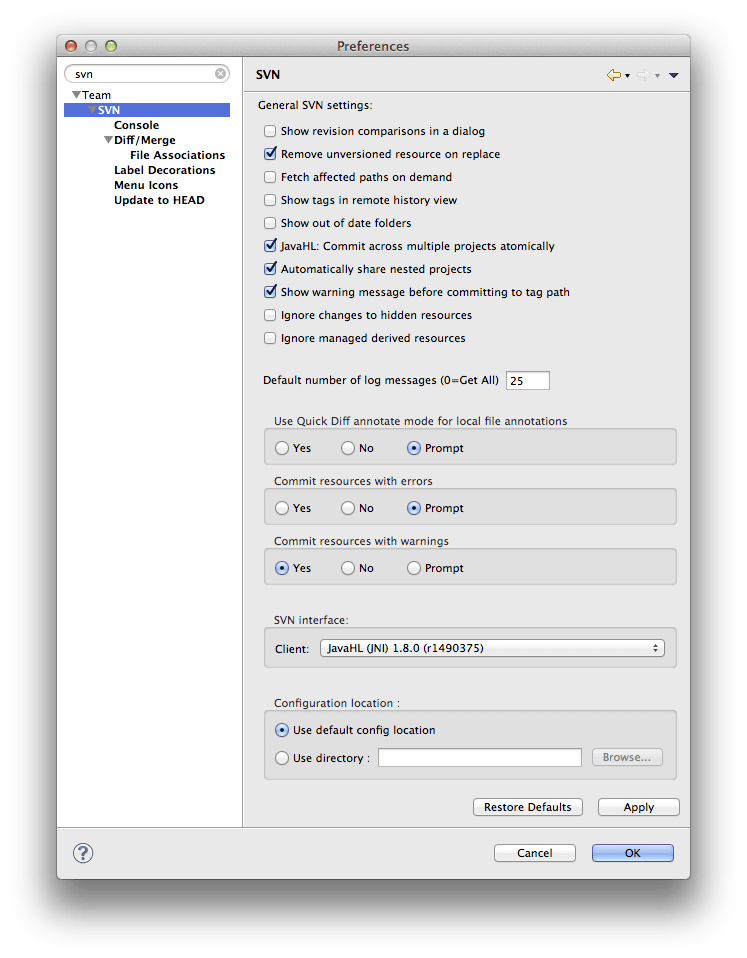
Don’t forget to install Subclipse Version 1.10 to use Subversion 1.8. In eclipse you can achieve that by changing the update site of your Subclipse Software Site to: http://subclipse.tigris.org/update_1.10.x.
Update 2014, 02 Feb
I’ve stopped usingsvn and switched to git.